Compare Canadian Immigration Practice Management Software
Understand the different types of immigration software, compare the capabilities that matter, and learn what to look for when choosing a platform for your practice.
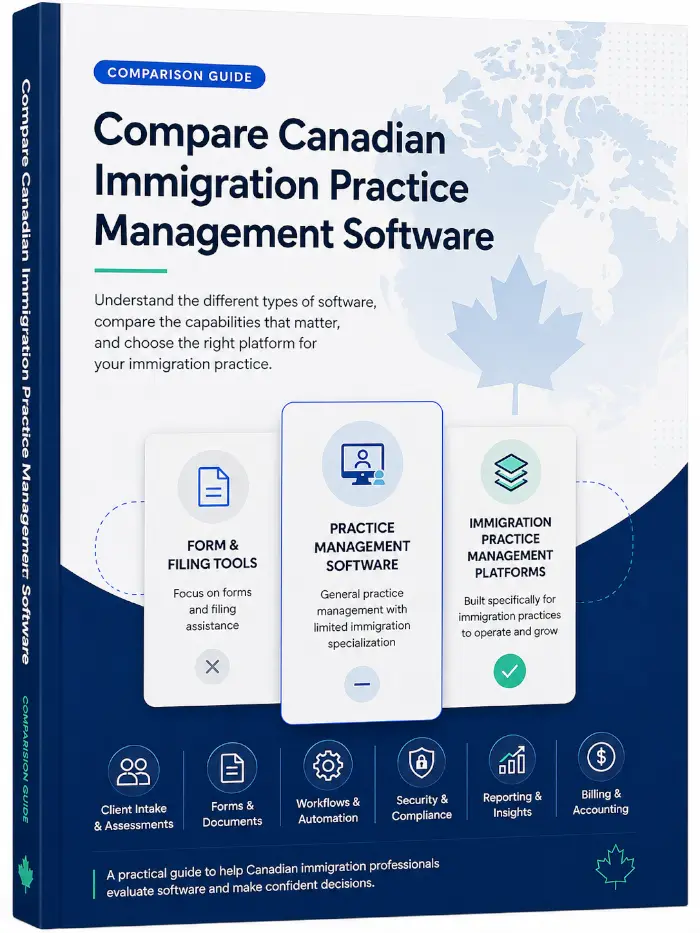
There is more than one type of immigration software
Not all immigration software serves the same purpose. Some products focus on forms, others on generic legal case management, while comprehensive immigration practice-management platforms cover the entire workflow.
Form & Filing Tools
Primarily designed to prepare immigration forms and streamline filing.
Typical Focus
- Forms & applications
- Filing assistance
- Broader practice operations
Generic Practice Management Software
Designed to manage legal matters broadly, but not specifically around Canadian immigration workflows.
Typical Focus
- Matters & contacts
- Billing & operations
- Immigration-specific workflows
Immigration Practice Management Platform
Combines Canadian immigration-specific case processing with the complete set of tools needed to run and scale your practice.
Complete Focus
- Immigration-specific case processing
- Practice management & operations
- Forms, filings & document automation
- Workflow automation & tasks
- Billing, payments & trust accounting
- Reporting, integrations & growth

CaseEasy brings it all together.
Built for Canadian immigration professionals who need depth, efficiency, and scalability in one complete platform.
What should you compare?
Before comparing named products, evaluate software against these dimensions.
Immigration workflow depth
How closely the platform's structure matches real Canadian immigration case processing.
Client intake & questionnaires
Whether intake adapts to matter type, or relies on generic forms.
Forms & filing automation
Direct IRCC form autofill versus manual re-entry of case data.
Practice/workflow management
Task automation, deadlines, and case status across the full matter lifecycle.
Employer & corporate immigration
Support for employer-driven matters alongside individual applications.
Integrations & extensibility
Whether the platform is a closed product or fits into a firm's broader technology stack.
Security & compliance
Data residency, access controls, and independent security assurance.
Scalability
Whether the platform fits a solo practice as well as a growing, multi-user firm.
Feature-by-feature comparison
A category-level view—not a claim about any single named competitor.
| Capability | CaseEasy 360 | Form-Filling Tools | Generic Legal Software |
|---|---|---|---|
| Canadian immigration workflows | Partial | Limited | |
| Dynamic immigration questionnaires | Varies | Limited | |
| Canadian immigration forms | Limited | ||
| Practice management | Limited | ||
| Employer management | Limited | Varies | |
| Workflow automation | Limited | Varies | |
| Client portal | Varies | ||
| Billing & payments | Limited | ||
| Canadian data hosting | Varies | Varies | |
| SSO | Enterprise | Varies | Varies |
| API / integrations | Varies |
"Form-Filling Tools" and "Generic Legal Software" refer to product categories, not any specific named vendor. Firms should confirm current capabilities directly with any vendor under evaluation.
Immigration-specific vs. generic practice management
A generic legal CRM or practice-management platform may handle matters, contacts, billing, and documents—but it wasn't built around Canadian immigration workflows. That gap often means significant manual work or third-party tools to cover intake questionnaires, IRCC form preparation, and immigration-specific compliance tracking.
Practice management vs. form-filling software
Form automation solves one part of the process. Firms still need intake, questionnaires, tasks, workflows, documents, employer management, billing, communication, and reporting around it. CaseEasy sits at the intersection: immigration specialization plus comprehensive practice management.
Built to grow with your immigration practice
CaseEasy isn't exclusively software for solo practitioners.
Independent & Small Practices
Manage every case, questionnaire, and deadline without juggling separate tools.
Growing Teams
Role-based permissions and workflow automation keep multiple staff aligned as caseload increases.
Established Firms
Employer-driven matters, reporting, and compliance tooling support higher case volume.
Enterprise & Institutional Teams
SSO, API access, and enterprise implementation support for firms with formal IT requirements.
Security & compliance checklist
Questions worth asking any immigration software vendor—and how CaseEasy answers them.
Where is data hosted?
Microsoft Azure, in the Canada East and Canada Central regions.
Is there independent security assurance?
CaseEasy has completed a SOC 2 Type 1 audit.
Is MFA supported?
Yes—included on the Advanced and Enterprise plans, and available as an add-on on other plans.
Is enterprise SSO available?
Yes, on the Enterprise plan.
How are backups handled?
Daily log backups, with a Recovery Time Objective (RTO) and Recovery Point Objective (RPO) of 24 hours.
What access controls exist?
Role-based permissions and audit logging.
How are third-party processors managed?
Subprocessors include Microsoft Azure (hosting and storage), Cloudflare (content delivery and security), AWS SES and Twilio (email and SMS), Stripe, LawPay, and Payload (payments), Drata (security and compliance management), and Intercom (live chat support between subscribing firms and CaseEasy Support).
What happens to data upon termination?
Governed by CaseEasy's Terms of Service.
Integrations & extensibility
A closed product locks a firm into one vendor's tools. CaseEasy offers API access and integrations, so it can fit into a firm's existing technology environment rather than replace it—an important distinction for firms with established systems or IT requirements.
Why firms choose CaseEasy
Purpose-Built for Canadian Immigration
Deep Canadian immigration workflows rather than generic legal matter management.
One Platform Beyond Forms and Filing
Manage intake, cases, documents, billing, communication, workflows, and reporting—not simply application preparation.
Individual and Employer-Driven Immigration
Manage both individual immigration matters and employer/corporate immigration workflows within the same platform.
Automation Across the Immigration Lifecycle
Automate intake, questionnaires, forms, documents, tasks, workflows, and repetitive case processes.
Ready for Sophisticated Firms and Enterprise
Canadian data residency, SOC 2, SSO, integrations, API capabilities, and enterprise implementation support.
Questions to Ask Before Choosing Immigration Practice Management Software
Choosing the right platform goes beyond comparing feature lists. Before committing to immigration practice management software, ask these questions to understand how the platform will fit your workflows, protect your data, support your team and scale with your practice.
What to look for
Ask which repetitive tasks are actually automated—not simply whether the software has “automation.” Consider intake, data collection, forms, document collection, follow-ups, workflows, billing and routine case administration.
How CaseEasy compares
CaseEasy automates work throughout the immigration lifecycle, including client assessments and intake, dynamic questionnaires, document collection, IRCC form preparation, workflows, reminders, billing and other repetitive case processes. Information collected through completed questionnaires can also be reused in future questionnaires, reducing duplicate data entry.
What to look for
Ask to see a complete immigration matter rather than a series of disconnected features. Pay attention to how information moves between intake, questionnaires, documents, forms, tasks, communications and billing.
How CaseEasy compares
CaseEasy brings the immigration case lifecycle into one platform. Firms can manage prospects and assessments, convert prospects to clients, collect information through dynamic questionnaires, request documents, prepare IRCC forms, manage workflows and tasks, communicate through the client portal, bill clients and maintain the case record through completion.
What to look for
Ask how quickly completed IRCC forms are generated and whether client information must be re-entered across forms and online portals.
How CaseEasy compares
CaseEasy generates supported IRCC forms instantly—in seconds—using information already collected through its questionnaires. CaseEasy is also extending this automation to IRCC online portals, with Permanent Residence and Express Entry Portal Autofill currently available in Early Preview to invited customers.
What to look for
Ask whether pricing is predictable or increases with the number of cases, forms, AI requests or other usage. Consider how the pricing model will affect your software costs as your practice grows.
How CaseEasy compares
CaseEasy's core case management is not priced per case. Firms can create and manage unlimited cases without their subscription cost increasing simply because they take on more matters. Optional add-ons and services may have separate pricing or usage limits.
What to look for
No platform eliminates every manual task. Ask vendors to clearly identify where staff review, judgment, verification or external actions are still required.
How CaseEasy compares
CaseEasy is designed to automate repetitive administrative work while keeping practitioners in control of professional decisions and final case review. For example, questionnaires can dynamically collect the required information and IRCC forms can be automatically populated, but your team remains responsible for reviewing the information and completed forms before submission.
What to look for
Understand who is responsible for moving data, configuring workflows, training staff and preparing the system for launch. Larger firms should also ask whether structured implementation assistance is available.
How CaseEasy compares
CaseEasy provides a self-service Data Import Wizard and also offers migration services for firms moving from another platform. Enterprise implementations can include system configuration, data migration, workflow setup, team onboarding, live training and structured firm-wide rollout. One-on-one training is also available.
What to look for
Consider what happens as your team, caseload and technology requirements grow. Ask about multi-user environments, workflow configuration, integrations, APIs and enterprise identity and security requirements.
How CaseEasy compares
CaseEasy supports independent practices, growing multi-user firms and enterprise immigration operations. Integrations include Microsoft 365 and Google Workspace email, QuickBooks, Calendly, Stripe, LawPay, Google Drive, Dropbox, OneDrive, SharePoint, Zapier and other services. Enterprise capabilities include API access, SSO, IP-based access restrictions, implementation support and customized integration requirements.
What to look for
Ask where core client information is hosted and where it may be processed. Pay particular attention to AI features, document analysis, integrations and other third-party services that may transmit client information outside the vendor's primary hosting environment. Ask whether AI processing is required to use the platform, which providers receive the data, whether AI features can be disabled, and whether processing locations are disclosed. “Canadian company” does not necessarily mean “Canadian data residency.”
How CaseEasy compares
CaseEasy's core customer data is hosted on infrastructure located in Canada. AI is not required to use CaseEasy's core practice-management features. AI-assisted features are optional and must be enabled by the firm, allowing firms to decide whether they wish to use services that involve AI processing. Where applicable, CaseEasy provides information about the service involved and relevant data-processing locations. Additional information about CaseEasy's security and infrastructure is available through its Trust Center.
What to look for
Ask about backup frequency, disaster recovery, recovery objectives and whether deleted information can be restored. Also consider whether you can maintain an independent copy of your records outside the vendor's platform.
How CaseEasy compares
CaseEasy maintains infrastructure backups and publishes a 24-hour Recovery Point Objective (RPO) and 24-hour Recovery Time Objective (RTO). Deleted cases, documents and forms can also be restored through the platform's Restore feature. Firms can optionally maintain independent copies of client records through supported cloud-storage integrations, including Google Drive, Dropbox, OneDrive, and SharePoint, with all backups synchronized twice daily.
What to look for
Don't settle for a statement that a platform is “secure.” Ask about independent assurance, encryption, authentication, access controls, security monitoring, penetration testing, incident response and documented security policies.
How CaseEasy compares
CaseEasy has achieved SOC 2 Type 1 and maintains a dedicated Trust Center for security due diligence. Security measures include AES-256 encryption at rest, TLS 1.2+ for data in transit, multi-factor authentication, access controls, audit logging, security monitoring and enterprise controls such as SSO and IP-based restrictions. The Trust Center also provides information on penetration testing, incident response, disaster recovery, vendor management and other security controls.
What to look for
Your firm's records should not become trapped inside a platform. Before subscribing, understand what can be exported, in what formats, and what happens to your information when your subscription ends.
How CaseEasy compares
CaseEasy allows firms to export their data, and supports automatic backups to a preferred third-party storage provider such as SharePoint, OneDrive, Google Drive, or Dropbox.
What to look for
Immigration practices have specialized requirements that generic legal software may not fully address. Ask how long the vendor has worked in Canadian immigration, how many firms use the platform and whether the product is built around Canadian immigration workflows.
How CaseEasy compares
CaseEasy has served Canadian immigration professionals since 2017 and is trusted by 500+ Canadian immigration firms. The platform is purpose-built around Canadian immigration workflows, including dynamic immigration questionnaires, IRCC forms, document requirements, client portals and employer/corporate immigration matters.
Grow your practice.Automate the busywork.
Join 500+ Canadian immigration firms who manage every case, document, and deadline in one platform.